You are here:Home » News » What Is An AC Control Board? Functions, Components And How It Works
What Is An AC Control Board? Functions, Components And How It Works
Views: 0 Author: Site Editor Publish Time: 2026-05-27 Origin: Site
Your air conditioner suddenly stops cooling. You call a technician who mentions "control board failure." Sound familiar? Most homeowners never think about this hidden component—until it breaks.
The AC control board is your HVAC system's brain. It coordinates every cooling and heating function silently behind the scenes. Without understanding how it works, you're left helpless when problems arise.
In this post, we'll explore what AC control boards do. You'll discover their key components and how they work together. We'll also cover failure signs, maintenance tips, and when to call professionals.
AC Control Board Functions: What Does It Actually Do?
Overview: The Orchestrator Behind Your Comfort
Think of your AC control board as a conductor leading an orchestra. Every component plays its part. The board ensures they work together seamlessly through constant communication and feedback loops. It receives signals from sensors, processes them, then sends commands to different parts. This happens thousands of times daily without you noticing.
The control board doesn't just react—it anticipates. It monitors pressure, temperature, and safety conditions simultaneously. When something goes wrong, it responds instantly. This coordination prevents damage and keeps your system running efficiently.
Temperature Regulation and Sensor Input
Your AC control board reads the room temperature through sensors placed strategically throughout your system. Here's how it actually works:
The Temperature Sensing Process:
●Sensors detect current room temperature continuously
●Data gets transmitted to the microcontroller as electrical signals
●The board compares actual temperature against your set point
●If there's a difference, it calculates the required response
When you set your thermostat to 72°F but the room reads 78°F, the control board springs into action. It initiates the cooling cycle by activating the compressor and blower motor. Real-time adjustments happen constantly—the board doesn't just turn on and off. Instead, it fine-tunes fan speeds and compressor operation to reach your target temperature smoothly.
This continuous monitoring prevents temperature swings. Your home stays comfortable rather than cycling between too cold and too warm. The feedback loop ensures stability throughout the day.
Mode Control and Fan Speed Management
Modern AC control boards manage five distinct operating modes, each serving different needs:
Operating Mode
Primary Function
Best Used For
Cool
Active air conditioning
Hot weather, daytime cooling
Heat
Heating operation
Cold seasons, winter warmth
Fan
Air circulation only
Mild weather, air movement
Auto
Switches between cool/heat
Seasonal transitions, hands-off operation
Sleep
Reduced energy consumption
Nighttime, energy savings
The control board switches between these modes based on your commands or automatic settings. When you press "auto" on your remote, the board monitors temperature and decides whether cooling or heating is needed. It handles the transition seamlessly without manual intervention.
Fan speed adjustment works similarly. Most systems offer three speeds—low, medium, and high. The control board receives your selection and adjusts the blower motor accordingly. Some advanced boards even vary fan speed automatically to maintain consistent comfort while minimizing energy use. This intelligent operation reduces electricity bills without sacrificing comfort.
Safety Protection and System Monitoring
Safety isn't an afterthought—it's built into every AC control board's core function. The board constantly monitors multiple safety parameters simultaneously:
Critical Safety Functions:
●Compressor overheating prevention through temperature sensors
●Freezing protection on outdoor coils during heating cycles
●High-pressure monitoring to prevent system damage
●Automatic shutdown when unsafe conditions develop
●Coordination with safety switches and limit devices
When pressure builds too high, the control board detects it immediately. It reduces compressor operation or shuts it down completely. This prevents catastrophic failure and protects your investment. Similarly, if outdoor coils risk freezing during heating, the board activates defrost mode automatically.
The board communicates with multiple safety devices throughout your system. High-pressure switches, flame sensors, and limit switches all feed information back to the microcontroller. If any device signals danger, the board responds instantly—sometimes shutting down the entire system to prevent damage or dangerous conditions.
Auto Restart Function and System Memory
Power outages happen. When electricity returns, your AC control board remembers exactly what it was doing. This auto-restart capability matters more than you'd think.
Before the outage, you had your system running in cool mode at 72°F with medium fan speed. The control board stores this information in its memory. When power restores, it automatically resumes those exact settings. You don't need to reconfigure everything manually. Your comfort preferences remain intact, and the system picks up where it left off seamlessly.
This feature prevents the frustration of returning home to find your AC hasn't restarted. It also maintains system continuity, ensuring your home climate stays regulated without interruption.
Defrost Management and Component Coordination
During heating cycles, outdoor coils can accumulate frost. This reduces efficiency and eventually stops heat transfer completely. Your AC control board handles this automatically through periodic defrost cycles.
The board monitors outdoor temperature and coil conditions. When frost risk appears, it activates defrost mode. The system reverses operation temporarily, using outdoor heat to melt frost buildup. This happens on a schedule—typically every 30-90 minutes depending on conditions. The process takes just 5-15 minutes, then normal heating resumes.
Component Coordination Sequence:
●Receives user command or sensor input
●Activates relays in proper sequence
●Starts blower motor first
●Engages compressor after motor stabilizes
●Adjusts dampers to direct airflow
●Monitors all components during operation
●Executes shutdown in reverse order
This sequential coordination prevents component stress. Starting the blower before the compressor protects the motor. Shutting down in reverse order prevents pressure spikes. Every action follows a carefully programmed sequence that protects your equipment and extends its lifespan.
The control board synchronizes everything so smoothly that you never notice the complexity happening behind the scenes. It prevents conflicts between components and ensures efficient operation throughout every cycle.
AC Control Board Components: What's Inside?
Overview: Understanding the Internal Architecture
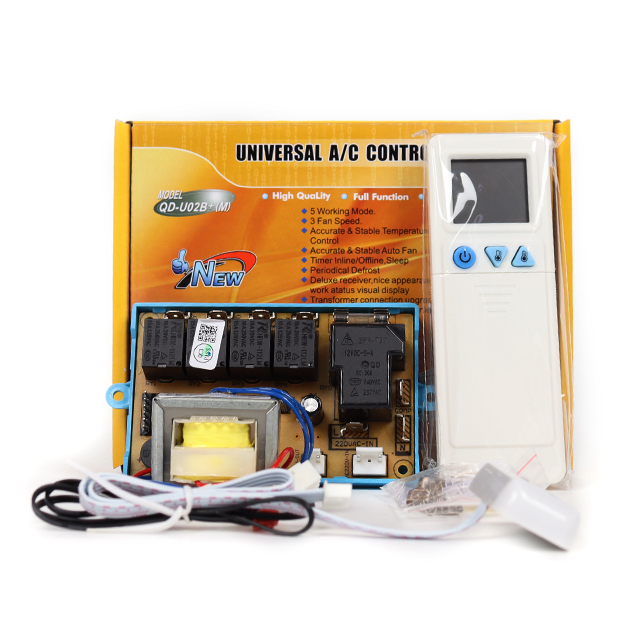
Open up an AC control board and you'll see a complex network of components working in harmony. Each piece serves a specific purpose. Together, they create a system capable of managing your entire HVAC operation. Understanding what's inside helps you appreciate how sophisticated this technology really is.
The board isn't just a random collection of parts. Every component connects strategically. They communicate through circuits and signals. This architecture allows the board to process information, make decisions, and execute commands—all simultaneously. It's engineering at its finest.
The Microprocessor/Microcontroller: The Brain
The microprocessor is your AC control board's true brain. It's a small computer programmed to handle everything. This chip receives sensor data, processes it, and sends commands to other components. Without it, nothing happens.
How the Microprocessor Works:
●Receives electrical signals from sensors throughout the system
●Compares current conditions against programmed parameters
●Executes pre-programmed logic to determine next action
●Sends control signals to relays and other output devices
●Repeats this cycle thousands of times per second
The firmware stored in EEPROM (Electrically Erasable Programmable Read-Only Memory) contains all the operating instructions. Think of it as the microprocessor's instruction manual. When you set your thermostat to cool mode at 72°F, the firmware tells the processor exactly how to achieve that. It handles temperature maintenance, fan speed adjustments, and safety protocols automatically.
Real-time decision-making is where the microprocessor shines. It doesn't just follow rigid instructions. Instead, it adapts based on current conditions. If the room heats up faster than expected, it increases compressor speed. If humidity rises, it adjusts fan operation. This dynamic response keeps your home comfortable without constant manual adjustments.
Power Supply Circuit and Voltage Management
Your AC control board needs stable, reliable power. The power supply circuit handles this critical job. It converts incoming AC power into the DC voltage components need. Without proper voltage regulation, components fail quickly.
Power Supply Functions:
●Converts AC power from your home's electrical system
●Generates DC power for microcontroller and sensors
●Regulates voltage to prevent fluctuations
●Protects against power surges and spikes
●Maintains consistent voltage delivery across all circuits
Most AC control boards use transformer-based power supplies. The transformer steps down high voltage into safer levels. Then rectifier circuits convert AC to DC. Voltage regulators ensure output stays stable even when input fluctuates. This multi-stage approach protects sensitive components from electrical damage.
Surge protection is built in. When lightning strikes or power spikes occur, the power supply absorbs the excess energy. This prevents damage to the microprocessor and other delicate components. It's why your AC survives electrical storms while other equipment fails.
Relays and Triacs: The Power Switches
Relays are electronically controlled switches. They receive signals from the microprocessor and switch high-voltage power on or off. Your AC control board typically has several relays—one for the compressor, one for the blower motor, and others for auxiliary functions.
Here's how relays operate: The microprocessor sends a low-voltage signal to the relay coil. This energizes the coil, which pulls a metal contact. The contact closes, completing a high-voltage circuit. Power flows to the compressor or blower motor. When the microprocessor removes the signal, the relay de-energizes and the contact opens. Power stops flowing.
Triacs are modern alternatives to relays. They're semiconductor devices that control power electronically without moving parts. They respond faster and last longer. Advanced AC control boards use triacs for precise speed control. They can vary power delivery smoothly, allowing the compressor to run at different speeds rather than just on or off.
Relay vs. Triac Comparison:
Feature
Relays
Triacs
Operation
Mechanical switch
Electronic switch
Speed
Slower response
Instant response
Lifespan
5-10 years typical
10-15 years typical
Noise
Audible clicking
Silent operation
Cost
Lower initial cost
Higher initial cost
Precision
On/off only
Variable control possible
Sensors and Input Systems: The Eyes and Ears
Sensors feed information to your AC control board constantly. Temperature sensors measure room and outdoor conditions. Pressure sensors monitor system pressure. Humidity sensors detect moisture levels. Each sensor sends electrical signals representing real-world conditions.
The microprocessor interprets these signals. A temperature sensor reading 75°F becomes a numerical value the processor understands. The processor compares this against your set point. If it's too high, cooling increases. If it's too low, cooling decreases. This feedback loop runs continuously during operation.
Sensor accuracy matters tremendously. A faulty temperature sensor might read 70°F when it's actually 75°F. The board thinks cooling is complete and shuts down. Your home gets hot. This is why sensor maintenance and occasional calibration are important. Clean sensors provide accurate readings. Dirty or damaged sensors cause comfort problems and efficiency losses.
Thermostat Connection and Signal Transmission
Your thermostat communicates with the AC control board through a standardized 24V signal system. When you adjust the thermostat, it sends specific voltage patterns to the board. The board interprets these signals and responds accordingly.
Thermostat Signal Types:
●Temperature set point (desired comfort level)
●Mode selection (cool, heat, fan, auto)
●Fan speed preference (low, medium, high)
●System on/off command
●Schedule information (in programmable models)
Modern systems use two-way communication. The board sends status information back to the thermostat. Your display shows whether the system is running, what mode it's in, and current temperature. This bidirectional communication enables advanced features like scheduling and diagnostics.
IR Receiver and Remote Control Integration
Infrared receivers let you control your AC from across the room. The receiver detects infrared light pulses from your remote. It decodes these pulses into commands the microprocessor understands.
The IR receiver must be positioned carefully. Direct sunlight and strong artificial light can interfere with signal reception. That's why most receivers sit in shaded areas inside the unit. The receiver's range typically extends 20-30 feet in ideal conditions. Obstacles like walls reduce this range significantly.
Remote compatibility varies. Universal remotes work across many brands. Proprietary remotes work only with specific systems. Modern AC control boards support both types. When you press a button on your remote, the IR receiver captures the signal, sends it to the microprocessor, and the board executes your command within milliseconds.
Display Unit and Diagnostic LEDs
Visual feedback helps you understand system status. Display units show current temperature, mode, and fan speed. Some boards include small LCD screens. Others use simple LED indicators.
Diagnostic LEDs flash specific patterns when problems occur. A single flash might mean one issue. A double flash indicates something different. Your system manual explains these patterns. By counting flashes and timing intervals, technicians diagnose problems quickly. This saves time and money during service calls.
Error codes appear on displays or through LED patterns. Common codes include compressor failure, sensor malfunction, or refrigerant pressure issues. Understanding these codes helps you communicate problems to service technicians accurately.
Safety Devices Integration and Automatic Protection
Your AC control board connects to multiple safety devices throughout the system. High-pressure switches prevent excessive pressure buildup. Flame sensors detect improper combustion in heating systems. Limit switches prevent overheating.
When any safety device detects a problem, it sends a signal to the microprocessor. The board responds immediately—usually by shutting down the problematic component or the entire system. This automatic protection prevents equipment damage and dangerous situations.
Safety Device Functions:
Device
Purpose
Action When Triggered
High-pressure switch
Prevents excessive pressure
Shuts down compressor
Flame sensor
Detects improper combustion
Stops heating operation
Limit switch
Prevents overheating
Reduces or stops operation
Freeze protection
Prevents coil freezing
Activates defrost cycle
Low-pressure switch
Detects refrigerant loss
Shuts down system
Capacitors and Resistors: Circuit Foundation
Capacitors and resistors are fundamental electronic components. Capacitors store electrical energy temporarily. They smooth voltage fluctuations and filter noise from power supplies. Resistors limit current flow and control voltage levels throughout circuits.
These components degrade over time. Capacitors dry out and fail. Resistors change value as they age. When they fail, circuit performance suffers. The microprocessor might receive incorrect voltage. Sensors might send garbled signals. This causes erratic system behavior or complete failure.
Preventive replacement of aging capacitors extends board lifespan significantly. Many technicians replace capacitors during routine maintenance on older systems. It's inexpensive insurance against unexpected failure.
Communication Ports and Smart Integration
Modern AC control boards include communication ports for external connectivity. These ports enable home automation integration, remote monitoring, and diagnostic access. Your system can connect to smart home platforms. Technicians can diagnose problems remotely using specialized tools.
Data logging capabilities track system performance over time. Temperature cycles, run times, and energy consumption get recorded. This historical data reveals patterns and helps predict maintenance needs. Some systems send alerts when performance degrades, prompting preventive service before failure occurs.
How Does an AC Control Board Work? The Complete Cycle
Overview: The Orchestration of Comfort
Your AC control board executes a precise five-step sequence every time you need cooling or heating. Each step builds on the previous one. The entire process happens seamlessly, often without you noticing anything. Understanding this cycle reveals how sophisticated your system really is.
The board doesn't just react to commands. It validates safety conditions first. Then it activates components in the correct order. Throughout operation, it monitors everything continuously. If problems develop, it responds instantly. This orchestrated approach ensures comfort, efficiency, and safety simultaneously.
Step 1 - The Call: Thermostat Sends the Signal
Everything starts when you adjust your thermostat. You set it to 72°F. The thermostat detects the difference between current room temperature and your desired setting. It springs into action immediately.
Your thermostat sends a 24-volt electrical signal to the AC control board. This signal carries critical information—the desired temperature, the mode you selected, and fan speed preference. The signal travels through wiring connecting your thermostat to the indoor unit. The AC control board receives this signal and begins interpreting it.
The microprocessor inside the control board decodes the signal. It extracts the temperature set point, mode selection, and other parameters. Signal strength verification ensures the message arrived intact. A weak or corrupted signal might cause the board to ignore the command or behave unexpectedly. Once verified, the microcontroller proceeds to the next step.
Signal Information Transmitted:
●Desired temperature set point (72°F in your example)
●Operating mode (cool, heat, fan, auto, or sleep)
●Fan speed preference (low, medium, or high)
●System on/off status
●Any special features (timer, schedule, etc.)
Step 2 - The Verification: Safety Checks
Before the AC control board activates anything, it performs comprehensive safety checks. This step prevents dangerous operation and equipment damage. The board checks multiple safety devices and sensor readings simultaneously.
High-pressure switches get verified first. These devices monitor refrigerant pressure. If pressure exceeds safe limits, the switch signals the board to hold off. The board also checks low-pressure switches to ensure adequate refrigerant exists. Temperature sensors throughout the system get validated. The board confirms outdoor coil temperature, indoor coil temperature, and compressor temperature all fall within acceptable ranges.
Component status confirmation happens next. The board checks whether the compressor, blower motor, and other parts are ready for operation. If any component shows signs of malfunction, the board prevents system startup. Flame sensors in heating systems detect proper combustion capability. Limit switches confirm temperatures remain safe. Only after all these checks pass does the board proceed to component activation.
Safety Verification Checklist:
Safety Parameter
Normal Range
Action If Out of Range
Refrigerant pressure
50-400 PSI (varies by system)
Hold startup, display error
Outdoor coil temperature
-20°F to 130°F typical
Prevent unsafe operation
Compressor temperature
Below 200°F typical
Delay startup if too warm
System voltage
24V ±10%
Prevent component damage
Flame detection(heating)
Flame present
Prevent heating without flame
Step 3 - The Start: Component Activation
Once safety verification completes, the AC control board activates components in a precise sequence. This ordering prevents electrical surges and mechanical stress. Improper sequencing damages equipment quickly.
The blower motor starts first. This seems counterintuitive, but it's intentional. Starting the blower before the compressor allows air circulation to stabilize. It prevents pressure spikes and protects the motor. The board sends a signal to the blower relay, energizing it. The relay closes, and power flows to the motor. The blower begins spinning.
After the blower stabilizes, the compressor relay receives its signal. The compressor starts running, drawing refrigerant and pressurizing the system. Dampers open or close to direct airflow appropriately. If you selected cool mode, dampers direct air through the outdoor condenser. If you selected heat mode, dampers route air differently. The board controls all these movements through relay signals.
Gradual power application prevents electrical surges. The board doesn't slam full voltage to components instantly. Instead, it ramps up power gradually. This soft-start approach extends component lifespan and prevents nuisance breaker trips. System stabilization takes 30-60 seconds. During this period, pressures equalize and temperatures stabilize before full operation begins.
Step 4 - The Cycle: Active Operation
Now your AC control board enters its primary job—maintaining your desired temperature while optimizing efficiency. The board monitors multiple parameters continuously during this phase. Temperature sensors feed data to the microprocessor thousands of times per second.
Real-time feedback loops allow the board to adjust operation dynamically. If the room cools faster than expected, the board reduces compressor speed or cycles it off temporarily. If cooling slows, the board increases compressor output. This continuous adjustment prevents temperature swings. Your home stays comfortable without cycling between too cold and too warm.
Fan speed adjusts automatically based on temperature and humidity. The board might run the fan at medium speed during moderate cooling needs. During peak heat, it increases to high speed. During light cooling, it reduces to low speed. These adjustments happen seamlessly based on system performance and comfort requirements.
Pressure and safety parameter monitoring continues throughout operation. The board watches compressor pressure, outdoor coil temperature, and indoor coil temperature. If any parameter drifts outside safe ranges, the board responds immediately. It might reduce compressor speed, activate defrost mode, or shut down the system entirely. This vigilant monitoring prevents equipment damage and maintains safe operation.
Active Operation Monitoring:
●Room temperature vs. set point (adjusts compressor speed)
●Humidity levels (adjusts fan speed)
●System pressures (prevents dangerous conditions)
●Outdoor temperature (optimizes efficiency)
●Component temperatures (prevents overheating)
●Energy consumption (maintains efficiency)
Step 5 - The Shutdown: Safe Deactivation
When your room reaches the desired temperature, the thermostat stops sending the call signal. The AC control board detects this signal cessation and begins controlled shutdown. This step is as important as startup. Improper shutdown causes equipment stress and reduces lifespan.
The compressor receives the shutdown signal first. It gradually reduces output rather than stopping instantly. This controlled power-down prevents pressure spikes and thermal shock. The compressor might run at reduced capacity for 30-60 seconds before stopping completely. This gradual approach protects the compressor and refrigerant system.
The blower motor continues running briefly after the compressor stops. This clears remaining cool air from ducts into your home. It also allows the system to cool down gradually. After 30-60 seconds, the blower motor stops. Dampers return to neutral position. The system resets and prepares for the next cycle. All relays de-energize, and power flows stop.
The board doesn't immediately forget what happened. It retains information about the cycle—how long it ran, what temperature it achieved, and any issues encountered. This data helps the board optimize future cycles. It also provides diagnostic information if problems develop.
Feedback Loop and Continuous Adjustment
The magic happens in the feedback loops running continuously throughout operation. Sensors monitor conditions. The microprocessor analyzes data. The board adjusts operation. This cycle repeats thousands of times per second.
Temperature overshoot and undershoot get prevented through predictive control. The board doesn't wait until the room reaches exactly 72°F to reduce cooling. Instead, it anticipates. When the room approaches 72°F, it begins reducing compressor output. This prevents overshooting to 71°F or undershooting to 73°F. Your temperature stays stable within one degree.
Adaptive control strategies adjust operation based on environmental changes. If you open a window, outdoor temperature rises, or humidity increases, the board detects these changes and responds. It increases cooling output to compensate. When conditions stabilize, it reduces output again. This dynamic response maintains comfort efficiently.
Energy efficiency optimization runs continuously. The board calculates the most efficient way to maintain your desired temperature. It might run the compressor at 60% capacity continuously rather than cycling on and off. Or it might cycle rapidly during peak demand. The board chooses the approach minimizing energy consumption for your current conditions. Over time, this intelligent operation reduces electricity bills significantly while maintaining comfort.
Conclusion
Your AC control board is your HVAC system's central coordinator. It manages temperature regulation, mode control, and safety protection simultaneously. Recognizing failure warning signs—visual damage, performance issues, error codes—helps prevent costly breakdowns.
Keep current with control board technology advances. Invest in quality diagnostic equipment. Maintain certifications and training regularly. Document every service procedure carefully. Recommend preventive maintenance to all clients. Stay informed about manufacturer updates. Build expertise in universal board installation. Communicate clearly about system status always.

 English
 العربية
 Français
 Русский
 Español
 Português
 Deutsch
 italiano
 日本語
日本語 한국어
한국어 Nederlands
 Tiếng Việt
 ไทย
ไทย Polski
 Türkçe
 አማርኛ
አማርኛ ພາສາລາວ
 ភាសាខ្មែរ
 Bahasa Melayu
 ဗမာစာ
ဗမာစာ Filipino
 Bahasa Indonesia
 magyar
 Română
 Čeština
 қазақ
қазақ Српски
 हिन्दी
 فارسی
فارسی Slovenčina
 Slovenščina
 Norsk
Norsk Svenska
 українська
 Ελληνικά
 Հայերեն
 Latine
 Dansk
Dansk Shqip
Shqip বাংলা
বাংলা Hrvatski
 Afrikaans
 Gaeilge
 latviešu
 Беларуская мова
 Български
 Esperanto
 Basa Jawa
 Kinyarwanda
 Soomaali
 Cymraeg