You are here:Home » News » AC Control Board Troubleshooting: A Complete Testing Guide
AC Control Board Troubleshooting: A Complete Testing Guide
Views: 0 Author: Site Editor Publish Time: 2026-05-30 Origin: Site
Is your air conditioner suddenly acting up?
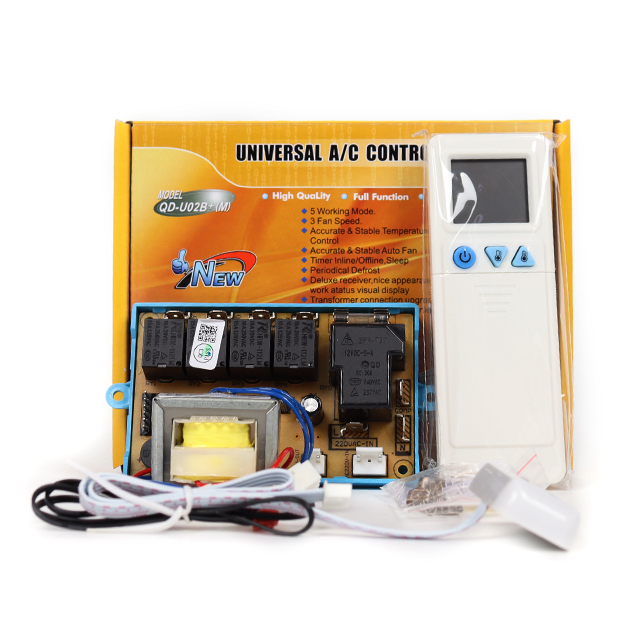
TheAC Control Boardacts as the brain of your cooling system. When it fails, your home comfort suffers.
Don't rush to pay for expensive, unnecessary repairs just yet. A systematic diagnosis can save you significant money.
In this post, you’ll learn how to test your unit effectively. We will help you identify if the issue is a simple fix or a total component failure. Let’s get your system running smoothly again.
Understanding the AC Control Board: The Brain of Your System
Think of theAC Control Boardas the central nervous system of your unit. It processes every command you send through your remote, ensuring the indoor and outdoor components work in perfect harmony. Without this circuit board, your air conditioner cannot interpret signals or manage power distribution. It acts as the primary gatekeeper, directing electricity to the fan, compressor, and sensors to maintain your desired indoor climate.
When this board encounters issues, the entire system often stops responding or behaves erratically. You might notice the unit remains completely unresponsive even when the power supply is active. Sometimes the fan might start spinning, yet the compressor stays silent, leaving you with nothing but warm air. These glitches often stem from a failing logic processor or damaged circuitry on the board itself.
Common Fault Symptoms
Potential Impact on Comfort
System fails to power on
Total loss of cooling or heating
Fan runs but compressor stays off
Air circulation without temperature control
Unstable temperature readings
Frequent cycling or uneven cooling
Auto-restart function failure
System fails to resume after power outages
Beyond these primary failures, you may experience issues with the auto-restart feature. This function is vital for maintaining comfort after a sudden power dip. If your unit refuses to return to its previous settings, the board is likely struggling to save or execute its internal instructions. Drawing on 17+ years of HVAC expertise, we focus on universal systems that provide stable temperature control and reliable auto-restart functions, much like those engineered by DABUND. These boards are built to handle the rigors of daily operation while ensuring your settings remain locked in.
You should also watch out for inconsistent temperature regulation. If your room feels like a sauna one minute and a freezer the next, the board might be misreading sensor data. It relies on precise inputs to decide when to engage the cooling cycle. When the logic becomes corrupted, it sends incorrect signals to the relays, causing the system to cycle on and off improperly. This not only ruins your comfort but also puts unnecessary stress on your compressor, which could lead to much larger repair bills down the line.
If you suspect your current board is the culprit, take a moment to observe the behavior of the unit closely. Does it show any error codes on the display? Are there any strange odors coming from the panel? Identifying these specific patterns early helps you decide whether you need a simple reset or a full hardware replacement. By understanding how theAC Control Boardcommunicates with the rest of your system, you gain the upper hand in diagnosing problems before they turn into major headaches.
Essential Safety First: Preparing for AC Control Board Troubleshooting
Before you touch any internal components, you must prioritize your personal safety above everything else. Working on anAC Control Boardinvolves exposure to high-voltage electricity, which can be dangerous if you are not careful. You need to treat every wire as if it is live until you have proven otherwise. Taking these precautions prevents accidental shocks and protects you from potential injury while you inspect your system.
●Shutting Down Power Sources:You must locate your home’s main electrical panel and flip the circuit breaker for your HVAC system to the off position. Do not stop there, as many units also feature a local disconnect switch near the outdoor condenser or the indoor air handler. Turning off both sources ensures that power cannot accidentally flow back into the unit while you work.
●Verifying Zero Current:Never assume the power is off just because you flipped a switch or pressed a button. You should always use a reliable, non-contact voltage tester to check the terminals on the board. Test every single connection point twice to be absolutely certain no electricity remains in the system before you proceed with your inspection.
Safety Step
Why It Matters
Main Breaker Off
Cuts off the primary power supply to the entire HVAC system.
Local Disconnect Off
Provides a secondary layer of protection right at the unit.
Voltage Tester Check
Confirms the absence of electrical current before you touch wires.
Many modern systems include a safety "door switch" that acts as a kill-switch whenever the blower panel is removed. This feature is great for regular operation, but it makes troubleshooting theAC Control Boardquite difficult during live testing. If you need to observe the board while it is powered, you must find a way to keep this switch engaged. You can use a small piece of electrical tape to hold the button down securely.
Be extremely cautious when you choose to bypass this safety mechanism for active testing. Since the unit will be live, you must keep your hands and tools away from high-voltage capacitors or exposed terminals. We recommend wearing insulated gloves and safety glasses throughout this process to minimize any remaining risks. If you feel uncomfortable working around live electricity, it is always better to step back and call a professional technician. They have the right gear and training to handle these complex situations without putting themselves in harm's way.
Step-by-Step Visual Inspection of Your AC Control Board
Before you reach for complex diagnostic tools, start your investigation with a thorough visual sweep. Many failures within anAC Control Boardleave behind clear physical evidence that you can spot in seconds. You need to examine both sides of the printed circuit board carefully under bright light. Look for any blackened paths, charred terminal blocks, or dark scorch marks that indicate a localized electrical overload. These signs often point to a specific component failure, helping you narrow down the source of your system trouble quickly.
●Component Integrity:Scan the board for capacitors that appear swollen, deformed, or show signs of leaking fluid. These small cylinders are prone to thermal stress over time and often fail long before the rest of the board. You should also inspect the small plastic cube relays for any signs of melted casings or warped edges. If a relay looks distorted, it likely suffered from internal arcing, which prevents it from switching power to your fan or compressor correctly.
●The Smell Test:Never underestimate your sense of smell during this process. A board suffering from a short circuit usually emits a distinct, pungent metallic or plastic burning odor. Even if you cannot see the damage immediately, this scent is a reliable indicator that something has overheated. Follow your nose to the specific area of the board where the smell is strongest to find hidden damage.
Inspection Target
What to Look For
Potential Consequence
PCB Surface
Charred paths or scorch marks
Permanent logic failure
Capacitors
Bulging tops or leaking fluid
Unstable power regulation
Relay Casings
Melted plastic or warping
Failed motor activation
Terminal Blocks
Discoloration or soot buildup
Poor electrical connection
Next, focus your attention on the on-board fuse, which serves as your system’s first line of defense. You can usually find this automotive-style fuse plugged directly into the board, often colored violet or amber. Carefully pull it out and hold it against a light source to inspect the internal metal filament. If you see a break or a dark cloud inside the glass, the fuse has blown to protect the board from a low-voltage short.
Replacing a blown fuse is sometimes all you need to restore functionality, but you must remain cautious. If the new fuse blows immediately upon power-up, you have a deeper short circuit somewhere in your wiring or attached components. This tells you theAC Control Boardis likely fine, but the fault lies elsewhere in your HVAC setup. Always keep a few spare fuses of the exact same amperage on hand, as they are inexpensive and can save you from unnecessary service calls. By methodically checking these physical signs, you ensure that you are not missing obvious failures that require simple, direct solutions.
Reading Diagnostic LED Error Codes
Modern HVAC systems often include built-in diagnostic lights to help you pinpoint issues quickly. You do not always need to open the unit to start your investigation. Most systems feature a small, clear plexiglass viewing window on the external housing. If you look through this window before removing any panels, you might see an LED flashing a specific sequence. This light is your first clue in understanding what is happening inside theAC Control Board.
●Interpreting Flash Patterns:Take a moment to watch the light carefully. It might blink in steady intervals, or it could show a complex pattern like three short flashes followed by a long pause. You should write down this sequence exactly as you see it. Once you have the pattern, look for the diagnostic chart printed on the inside of your blower access door. This legend maps each flash sequence to a specific system fault.
●Identifying Logic Failures:Sometimes the board reports an error for a part that you have already confirmed is working perfectly. For example, the light might indicate an "open safety switch" even when you have manually verified the switch is closed. This situation is known as "Board Illogic." It means the internal processor on yourAC Control Boardhas failed to interpret the signals correctly. When the logic processor stops thinking clearly, the board can no longer manage your system, and you will need a replacement.
LED Behavior
What It Usually Means
Action Required
Solid Light
System is in standby or normal mode
No action needed
Rapid Blinking
Communication error or signal loss
Check wiring harnesses
Periodic Flashing
Specific component fault code
Consult the schematic legend
No Light
No power or dead control board
Check power and fuse
You must be patient when counting these flashes to ensure accuracy. Some systems use very fast blinks, while others are slower and more deliberate. If you find the pattern confusing, wait for the cycle to repeat a few times. Most boards will loop the error code until the power is cycled or the fault is cleared. Recording these codes helps you communicate more effectively with a technician if your own troubleshooting steps do not resolve the issue.
Always remember that these diagnostic lights are tools, not final judgments. They provide a window into the mind of yourAC Control Board, but they cannot replace your physical observations. If the LED points to a sensor fault, check the sensor wiring first before assuming the board has failed. By combining these digital clues with your own mechanical inspection, you build a much clearer picture of what your unit needs to get back to full performance.
FAQ
Q: What is the difference between DIY troubleshooting and professional repair?
A: DIY troubleshooting involves basic inspections and cleaning, like checking filters or wires. Professional repair handles complex electrical faults, refrigerant leaks, and combustion issues requiring specialized training.
Q: Why does my AC control board keep blowing fuses?
A: A recurring blown fuse indicates a persistent low-voltage short circuit in your wiring or attached components. You must locate the short before replacing the fuse again.
Q: How often should I perform a visual inspection of my HVAC components?
A: Inspect your system biannually. Regular checks help identify debris, corrosion, or loose connections early, preventing major failures.
Q: What tools are essential for a homeowner's HVAC diagnostic kit?
A: You need a multimeter, voltage tester, insulated gloves, safety glasses, and non-conductive tools for safe, accurate diagnostics.
Conclusion: Restoring Your Comfort
A methodical approach is key to fixing your system. It prevents you from masking deeper, underlying problems.
Always document your findings and keep clear service logs. This information helps professional technicians if you need advanced help.
Take full control of your home comfort today. Stay proactive with your regular HVAC maintenance to ensure lasting performance.

 English
 العربية
 Français
 Русский
 Español
 Português
 Deutsch
 italiano
 日本語
日本語 한국어
한국어 Nederlands
 Tiếng Việt
 ไทย
ไทย Polski
 Türkçe
 አማርኛ
አማርኛ ພາສາລາວ
 ភាសាខ្មែរ
 Bahasa Melayu
 ဗမာစာ
ဗမာစာ Filipino
 Bahasa Indonesia
 magyar
 Română
 Čeština
 қазақ
қазақ Српски
 हिन्दी
 فارسی
فارسی Slovenčina
 Slovenščina
 Norsk
Norsk Svenska
 українська
 Ελληνικά
 Հայերեն
 Latine
 Dansk
Dansk Shqip
Shqip বাংলা
বাংলা Hrvatski
 Afrikaans
 Gaeilge
 latviešu
 Беларуская мова
 Български
 Esperanto
 Basa Jawa
 Kinyarwanda
 Soomaali
 Cymraeg